How to make a vial label
From a bare vial to a printed label in six steps. It takes one sitting to design and order; we print and mail the labels to you.
1. Decide what the label needs to say
A vial label is small, so keep it to what you need to read at a glance. Most people pick a few of these:
- A short name you'll recognise (Vial A, Blend No. 2, Mornings)
- The amount written on the vial
- The date you opened it
- A lot or batch number
- A storage note, such as "Keep cold"
- A strip of weekdays, a colour for each vial, or a QR code linking to your own notes
Everything on the label is your own wording. We don't fill anything in or check it, so write it the way you'll want to read it later.
2. Pick how you want to make it
Go to Make a label and choose one of four ways:
- Upload a label you already have, or a photo or logo to build one around.
- Design it here in the Label Studio, on a computer or tablet.
- Describe it and we'll make it: tell the AI label maker what you want, on a phone or computer.
- Make it with ChatGPT: add Labels for Peps to your own ChatGPT, describe the label, then save it and order it here. How it works.
3. Design for a small, curved label
The standard label is 1.75 × 0.75 inches and wraps around a 3 mL or 5 mL vial, so part of it curves out of view. A few habits keep it readable:
- Make the name the biggest thing on the label.
- Use strong contrast: dark text on a light colour, or light text on a dark one.
- Keep important words away from the very edges. The studio can show a safe-zone guide.
- Use a different colour or look for each vial so you can tell them apart in the fridge.
- Check the 3D vial preview in the studio to see how the label sits when it wraps.
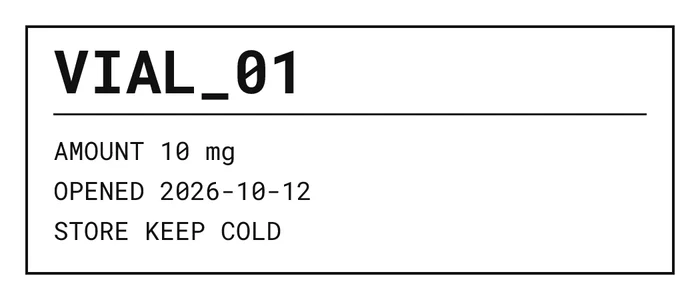
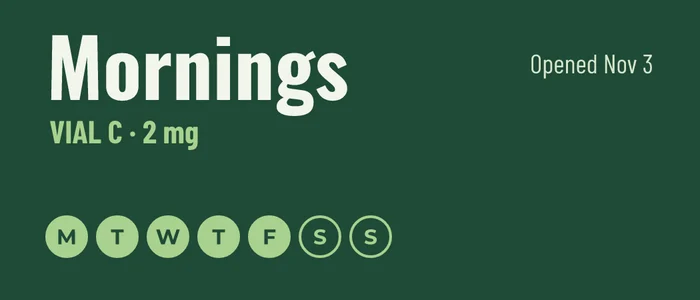
Example labels; the numbers on them are made up.
4. Check the proof
Before you order, read your label out loud: every name, number, date and lot. We print exactly what you approve and don't edit your wording, so the proof is your last chance to catch a typo.
5. Order your labels
Add the label to your cart and choose how many you want and whether you'd like glossy or matte (same price; glossy is the default). Each label costs less the more of one design you order, and shipping is one flat rate per order. Pay with Stripe Checkout. Prices are on the vial labels page.
6. Stick them on
We print your labels in-house and mail them to US addresses, with an email and a tracking link when they ship. When they arrive, put each label on a clean, dry vial: line up one short edge, then smooth it around the vial so no air is trapped. The labels are waterproof and fridge-safe, so the vial can go straight back in the fridge. More on that in waterproof vial labels.
Questions
Can I make a vial label on my phone?
Yes. On a phone, use the AI label maker: describe the label you want and change anything by tapping or asking. The Label Studio is for computers and tablets.
I already have a design. Can I just upload it?
Yes. Upload a finished label as a PNG, JPG, SVG or PDF at 1.75 × 0.75 inches and we print it as is. A PDF at exactly that size prints as is too.
Will you fix a typo on my label?
No. We print every label exactly as you approve it and don't edit your wording, so check names, numbers and dates on the proof before you order.
Can I order several different labels at once?
Yes. Make as many designs as you like and order them together. Each design is priced on its own count.